
Email phishing in Q3 2026: SVG, CAPTCHA and the risk of security exceptions
Davide Quattrocchi
CEO · 20 November 2026

In the third quarter of 2026, the most underestimated risk in business email is the security exceptions that organisations configure themselves. In September, 63% of emails spoofing services such as DocuSign or Adobe, and that had a recorded security verdict, were covered by an override set by the tenant or by the user.
The figure comes from Microsoft Threat Intelligence’s quarterly report, published on 5 November 2026. Below are the key figures and seven concrete actions for IT managers and CISOs.
In brief
- In Q3 2026 Microsoft detected about 7.3 billion email phishing threats; in September almost 3 billion, +41% on August.
- In September, 63% of spoofed emails from services such as DocuSign and Adobe, with a recorded verdict, were covered by a security exception (override).
- In August, malicious SVG attachments reached 10.1 million, the highest in over a year, often used to lead to CAPTCHA-protected phishing pages.
How many phishing emails did Microsoft detect in Q3 2026?
Between July and September Microsoft detected about 7.3 billion email phishing threats. September alone accounted for almost 3 billion, 41% more than August.
The increase did not affect every technique equally. QR code phishing fell, while CAPTCHA-protected phishing started growing again.
| Indicator | Q3 2026 value |
|---|---|
| Email phishing threats detected | about 7.3 billion |
| Emails spoofing business service domains | about 129 million |
| QR code attacks | about 12.1 million (−67% vs Q2) |
| Business contact impersonation (BCI) attacks | about 6.2 million |
| Malicious call attempts on Microsoft Teams | about 141,000 |
| Malicious attachments aimed at credential theft | 94–96% |
Source: Microsoft Threat Intelligence, Email threat landscape: Q3 2026.
Why security exceptions let phishing through
A security exception (or override) is a rule, set in the tenant or by an individual user, that gets a message delivered even when the filters consider it malicious: allow lists, transport rules, trusted senders.
During the quarter Microsoft counted about 129 million emails that used the real domain of widely used business services as the sender, such as DocuSign, Adobe, SurveyMonkey and Barracuda. In September DocuSign was the most impersonated brand, with 29% of the total.
These emails did not pass authentication checks and had already been classified as malicious. Yet many were delivered, because an exception configured by the organisation or by the user overrode the protection. In September, overrides covered 63% of messages with a recorded verdict, mostly set at tenant level.
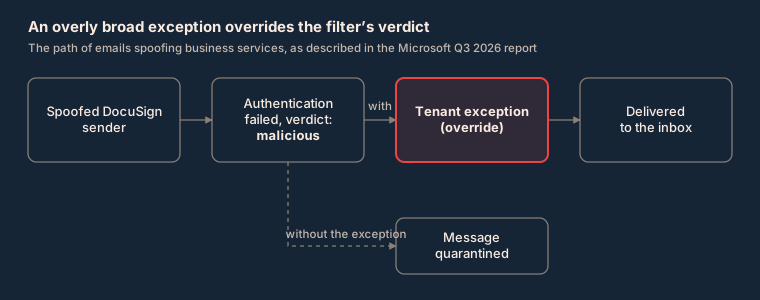
Microsoft clarifies that the figure does not prove that messages were opened or accounts compromised. It does show a very common mechanism: an exception is created so as not to block a legitimate flow, such as a supplier’s digital signatures, and ends up protecting whoever imitates it as well.
A familiar logo is no substitute for an authenticated sender.
SVG attachments and CAPTCHA-protected phishing: why they are growing
SVG files were the vector that grew the most in the quarter. In August, malicious SVG attachments reached 10.1 million, the highest monthly volume in over a year.
An SVG (Scalable Vector Graphics) file looks like an image, but it can contain code and links. That is why it is used to take the user to a fake login page, often behind a CAPTCHA. The CAPTCHA hides the phishing page from automated scanners and makes it look more credible to the user.
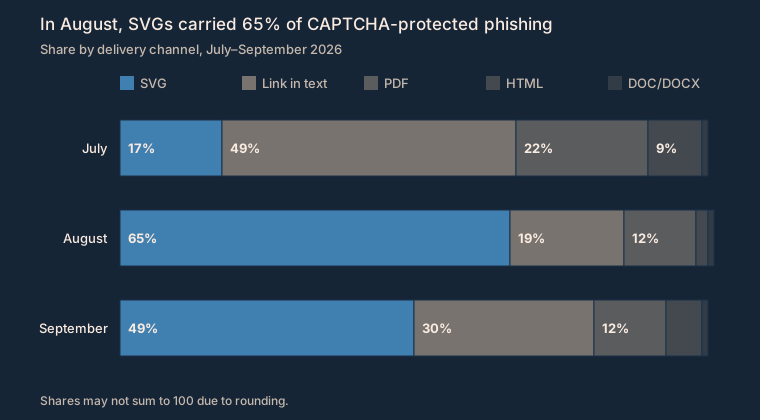
In September Microsoft detected 3.1 million CAPTCHA-protected attacks, almost double July’s low. SVGs carried 65% of these attacks in August and 49% in September, remaining the top channel at the end of the quarter.
Between 94 and 96% of malicious attachments were aimed at stealing credentials, not at installing software.
Do SPF, DKIM and DMARC protect against phishing?
Not on their own. SPF, DKIM and DMARC remain the foundation: they stop anyone from using your domain as a sender. Two campaigns in the quarter show, however, that they are not enough on their own.
On 21 September a Spanish-language campaign hit over 56,000 users in more than 8,100 organisations, with fake purchase orders and payslips. The sender domain passed SPF, DKIM and DMARC: authentication was valid, but the display name imitated the recipient’s sales or human resources department. The attachments were archives with double extensions leading to the Agent Tesla malware, used to steal credentials.
In August another campaign targeted law firms with a fake salary review. The attached document contained a QR code leading to a technique called device code phishing. The user entered a code on the genuine Microsoft portal and handed the attacker a valid session, without exposing the password and without a new MFA check.
Protecting your own domain keeps it from being used to attack others, while filters, policies and training keep you from falling into traps that arrive from other people’s domains.
How to defend: 7 actions for Microsoft 365 and Google Workspace
Starting from the report’s recommendations, these are the actions we advise for anyone managing Microsoft 365 or Google Workspace.
- 1Inventory and review exceptions. List allow lists, transport rules and trusted senders at tenant and user level. Remove the ones that are too broad and replace domain-based exceptions with rules that require an authenticated sender.
- 2Protect attachments and links. Turn on sandbox attachment analysis and link rewriting (in Microsoft 365: Safe Attachments and Safe Links), and consider blocking or quarantining formats such as SVG and HTML when the business does not need them.
- 3Remove what has already arrived. Turn on automatic removal of already delivered messages when a threat is reclassified (in Microsoft 365: Zero-hour auto purge).
- 4Strengthen user authentication. Use phishing-resistant methods such as FIDO keys or passkeys, at least for privileged accounts, and restrict the device code flow where it is not needed.
- 5Control Teams. Limit chats and calls with external users to trusted domains and to the roles that need them.
- 6Manage SPF, DKIM and DMARC on all domains. Move DMARC to a quarantine or reject policy, including parked domains that do not send email.
- 7Train people. Realistic phishing simulations, with lures such as payslips, invoices and signature requests.
How Koent works
Koent supports IT managers and CISOs of companies that use Microsoft 365 and Google Workspace with a managed Email Security and Email Trust service.
- Tenant review and hardening: we analyse policies, exceptions and mail rules, close overly broad whitelists and align the configuration with the recommended settings.
- Protection from malicious attachments and links: we configure filters, attachment analysis and post-delivery removal, including emerging formats such as SVG.
- Domain authentication: we manage SPF, DKIM and DMARC in partnership with EasyDMARC, with reports and continuous monitoring on all domains, including parked ones.
To get started, you can check your domain’s email configuration for free with Koent Domain Sentinel. In a few minutes you see how SPF, DKIM and DMARC are set up and where to act.
Frequently asked questions
What are security exceptions in email?
They are rules such as allow lists, transport rules and trusted senders that get a message delivered even when the filters judge it malicious. In September 2026 they covered 63% of spoofed emails from services such as DocuSign and Adobe that had a recorded verdict.
Why are SVG attachments dangerous?
An SVG file looks like an image but can contain code and links. It is used to take the user to a fake login page, often protected by a CAPTCHA. In August 2026 there were 10.1 million malicious SVG attachments.
What is CAPTCHA-protected phishing?
It is a phishing page hidden behind a CAPTCHA, which keeps it from automated scanners and makes it more credible to the user. In September 2026 Microsoft detected 3.1 million of these attacks.
What is device code phishing?
It is a technique in which the user enters a code on the genuine Microsoft portal and hands the attacker a valid session, without exposing the password and without a new MFA check. It is reduced by restricting the device code flow where it is not needed.
Do SPF, DKIM and DMARC protect against phishing?
They stop others from using your domain as a sender, but they do not stop emails sent from other people’s correctly authenticated domains. In Q3 2026 a campaign with valid SPF, DKIM and DMARC hit over 56,000 users in more than 8,100 organisations.
Sources
Davide Quattrocchi
CEO at Koent
Want to apply these ideas to your software?
Tell us what you are building: we will show you where more efficient code and infrastructure save energy and cost.